
Introduction#
This introduction explains some key terms to understand the scope and structure of this webpage and shows how to use it.
Fedlex#
The Swiss federal government operates the Fedlex platform to publish the federal law. This platform provides a website as frontend with easy navigable functions for finding and reading the federal law.
Metadata and the Actual Text#
The data on the Fedlex platform can be divided into two main categories: the metadata and the actual text of the legal documents. The metadata contains all the information about a legal document that is not part of the actual text but is necessary to understand the context of the document, its relationships to other documents and its history. The actual text on the other hand, is the content of the legal document itself.
The actual text of the legal documents is available in different formats (e.g. HTML, XML, PDF) through the website of Fedlex. Thereby, only the XML files contain the actual text as structured data. This machine readable data is modelled according to the Akoma Ntoso standard. But this is not part of the JOLux ontology and not the focus of this website.
JOLux Ontology#
The metadata of all the legislative documents of the Fedlex platform is available as RDF metadata that is modelled according to the JOLux ontology. This ontology is used for describing legislative resources and their relationships. JOLux is based on recent developments in bibliographical description, adapting the FRBR model (Functional requirements for Bibliographic Records, developed by the IFLA) in order to describe legislative resources.
This website’s goal is to document the JOLux ontology and help users to find their way into the RDF metadata of the Fedlex platform and make the most use of it. It is not the basis for the JOLux ontology meaning that there is no completeness of all the aspects of JOLux in this documentation. So this website can not be used to model metadata according to the JOLux ontology but rather to understand metadata that is already modelled with help of JOLux. If complete insight into the JOLux ontology is necessary, it can be downloaded as Turtle file for further investigation.
How to Use this Website#
This website has sub-pages for all the important concepts. A concept is loosely defined an important element of the JOLux ontology. These sub-pages describe the concept in prose. Additional call-out boxes give short definition of JOLux and other terms (see the example below for ontology). These boxes are all linked in the reference.
Ontology
An ontology is a set of precise descriptive statements about some part of the world (usually referred to as the domain of interest or the subject matter of the ontology). Precise descriptions satisfy several purposes: most notably, they prevent misunderstandings in human communication and they ensure that software behaves in a uniform, predictable way and works well with other software. Source
The visual representation of parts of the JOLux ontology on this website is loosely based on the VOWL project. In addition, multiple colors represent the different abstraction levels of JOLux.
The following figure shows the elements of graphical representation of JOLux in this documentation using an example of a jolux:Act:
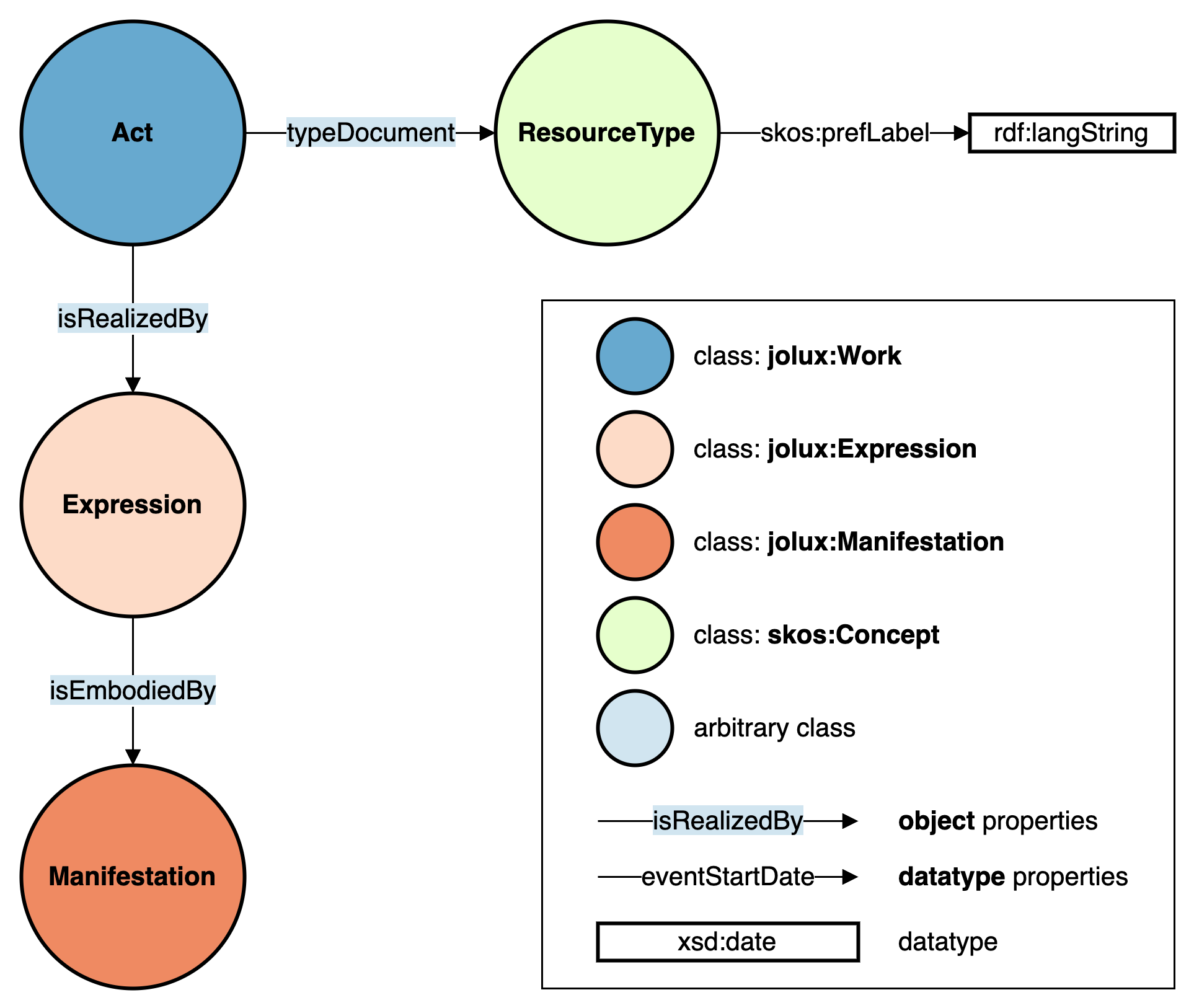
Graphical representation of JOLux ontology elements.#
The figure above can be read as: Some object of type jolux:Act is connected to an object of type jolux:Expression via predicate jolux:isRealizedBy. So the single bubbles do not represent concrete objects but signal class memberships.
Website as PDF#
This website is also available as PDF.
SPARQL Queries#
Throughout this webpage, there are examples of SPARQL queries given. The idea is, that these are real queries that can be executed on the Fedlex SPARQL GUI to get real up to date results. To do so, below every SPARQL example query, there is a “Execute Query” button that transfers the corresponding query into the SPARQL GUI and executes it to show the tabular result. As the source code of these queries is also given, the user should be encouraged to modify these queries directly in the SPARQL GUI or use it programmatically to their own needs.
The following SPARQL query shows this method by giving the 10 newest published jolux:Act that are available:
PREFIX jolux: <http://data.legilux.public.lu/resource/ontology/jolux#>
SELECT * WHERE {
    ?act a jolux:Act;
         jolux:publicationDate ?date.
} ORDER BY DESC(?date)
LIMIT 10
SPARQL Tutorial for JOLux#
There is also a tutorial in the form of a JupyterLite notebook available that can be run in the browser. The main focus of this interactive tutorial are the SPARQL queries necessary to work with the Fedlex JOLux data. In the notebook, these queries can be directly executed and changed by the user. The tutorial is available here.
Fedlex URI and URL#
All URI of Fedlex raw data resources start with: https://fedlex.data.admin.ch/eli whereas eli is an abbreviation for European Legislation Identifier.
These URI can be found on the website of Fedlex through a search. The raw data URI is not the URL shown in the browser address field but can be copied by clicking on the chain icon. If an an URI is put into the browser address field, there is an automatic redirection to the webpage URL that displays the corresponding resource.
Examples for the federal constitution in the Classified Compilation:
The easiest way to have a graph like representation of a Fedlex URI (and not a redirection to the URL) is to put it into the metadata viewer of the Fedlex platform. Links to the metadata viewer with prefilled URI can also be programmatically created via URL parameter value with the desired URI:
https://fedlex.data.admin.ch/en-CH/metadata?value=https://fedlex.data.admin.ch/eli/cc/1999/404
The URLs given in this documentation are given without language identifier. In reality, there is no such URL as https://www.fedlex.admin.ch/eli/cc/1999/404 but only https://www.fedlex.admin.ch/eli/cc/1999/404/en or with other language identifiers like de, fr, it or rm in the end. But there is a redirection mechanism in place that automatically redirects to the correct language URL according to browser settings if no language identifier is given.
Namespaces Declarations#
The following namespaces are used throughout this documentation:
PREFIX |
URI |
|---|---|
jolux |
|
schema |
|
skos |
|
dcterm |
|
xsd |
|
rdfs |
|
rdf |
|
owl |
|
eu |